mobile-next/mobile-mcpPublic

Model Context Protocol Server for Mobile Automation and Scraping (iOS, Android, Emulators, Simulators and Real Devices)

AI summary: An MCP server that enables AI agents to visually inspect and control iOS and Android devices via a unified interface.

Stars
8.6K
+158 today
Forks
754
Watchers
49
Open issues
29
Open PRs
14
Contributors
~31
Commits
438
Branches
38

TypeScriptApache-2.0Created Mar 28, 2025Last push 2d agoLatest release 1.0.4+1.3K stars this week+1.3K this month

Quick answers

What is mobile-mcp?
An MCP server that enables AI agents to visually inspect and control iOS and Android devices via a unified interface.
What does mobile-mcp do?
Mobile Next bridges the gap between Large Language Models and mobile operating systems by providing a standard Model Context Protocol server. It translates complex accessibility trees and screen captures into structured data that LLMs can understand. Agents can then issue platform-agnostic commands to tap, swipe, and input text across both iOS and Android. This allows tools like Claude Code or Copilot to autonomously test mobile apps or execute tasks on real devices and emulators without needing platform-specific automation scripts.
Who is mobile-mcp for?
Mobile developers and QA engineers building autonomous testing agents. Requires an MCP-compatible client and local mobile development environments.
How do I get started with mobile-mcp?
npm install -g @mobile-next/mcp
How popular is mobile-mcp on GitHub?
mobile-next/mobile-mcp has 8,565 stars and 754 forks on GitHub, and gained 1,279 stars in the last 7 days.
What license does mobile-mcp use?
mobile-next/mobile-mcp is released under the Apache-2.0 license.

Star history

since Sep 26, 2026
02.5K5K7.5KSep 2026Sep 2026Sep 2026Oct 2026
8.6K stars as of Oct 2, 2026. Measured daily since Sep 26, 2026; GitHub no longer exposes earlier star timestamps.

Contribution activity

commits per day, last 52 weeks
SepOctNovDecJanFebMarAprMayJunJulAugSepMonWedFri2025-09-28: 0 commits2025-09-29: 0 commits2025-09-30: 0 commits2025-10-01: 0 commits2025-10-02: 0 commits2025-10-03: 0 commits2025-10-04: 0 commits2025-10-05: 0 commits2025-10-06: 4 commits2025-10-07: 4 commits2025-10-08: 9 commits2025-10-09: 0 commits2025-10-10: 0 commits2025-10-11: 0 commits2025-10-12: 0 commits2025-10-13: 0 commits2025-10-14: 0 commits2025-10-15: 0 commits2025-10-16: 0 commits2025-10-17: 0 commits2025-10-18: 0 commits2025-10-19: 0 commits2025-10-20: 3 commits2025-10-21: 0 commits2025-10-22: 0 commits2025-10-23: 0 commits2025-10-24: 0 commits2025-10-25: 0 commits2025-10-26: 0 commits2025-10-27: 0 commits2025-10-28: 0 commits2025-10-29: 0 commits2025-10-30: 0 commits2025-10-31: 3 commits2025-11-01: 4 commits2025-11-02: 0 commits2025-11-03: 0 commits2025-11-04: 0 commits2025-11-05: 0 commits2025-11-06: 0 commits2025-11-07: 0 commits2025-11-08: 0 commits2025-11-09: 0 commits2025-11-10: 2 commits2025-11-11: 0 commits2025-11-12: 0 commits2025-11-13: 0 commits2025-11-14: 1 commit2025-11-15: 0 commits2025-11-16: 0 commits2025-11-17: 0 commits2025-11-18: 2 commits2025-11-19: 1 commit2025-11-20: 0 commits2025-11-21: 0 commits2025-11-22: 0 commits2025-11-23: 0 commits2025-11-24: 0 commits2025-11-25: 0 commits2025-11-26: 0 commits2025-11-27: 0 commits2025-11-28: 0 commits2025-11-29: 0 commits2025-11-30: 0 commits2025-12-01: 0 commits2025-12-02: 0 commits2025-12-03: 0 commits2025-12-04: 0 commits2025-12-05: 0 commits2025-12-06: 0 commits2025-12-07: 0 commits2025-12-08: 3 commits2025-12-09: 2 commits2025-12-10: 0 commits2025-12-11: 0 commits2025-12-12: 0 commits2025-12-13: 0 commits2025-12-14: 0 commits2025-12-15: 0 commits2025-12-16: 0 commits2025-12-17: 0 commits2025-12-18: 0 commits2025-12-19: 0 commits2025-12-20: 0 commits2025-12-21: 0 commits2025-12-22: 0 commits2025-12-23: 0 commits2025-12-24: 0 commits2025-12-25: 0 commits2025-12-26: 0 commits2025-12-27: 0 commits2025-12-28: 0 commits2025-12-29: 0 commits2025-12-30: 0 commits2025-12-31: 0 commits2026-01-01: 3 commits2026-01-02: 1 commit2026-01-03: 0 commits2026-01-04: 0 commits2026-01-05: 1 commit2026-01-06: 0 commits2026-01-07: 0 commits2026-01-08: 0 commits2026-01-09: 0 commits2026-01-10: 0 commits2026-01-11: 0 commits2026-01-12: 0 commits2026-01-13: 0 commits2026-01-14: 0 commits2026-01-15: 2 commits2026-01-16: 0 commits2026-01-17: 0 commits2026-01-18: 0 commits2026-01-19: 0 commits2026-01-20: 0 commits2026-01-21: 0 commits2026-01-22: 0 commits2026-01-23: 0 commits2026-01-24: 0 commits2026-01-25: 0 commits2026-01-26: 0 commits2026-01-27: 3 commits2026-01-28: 0 commits2026-01-29: 0 commits2026-01-30: 0 commits2026-01-31: 0 commits2026-02-01: 1 commit2026-02-02: 1 commit2026-02-03: 2 commits2026-02-04: 0 commits2026-02-05: 0 commits2026-02-06: 0 commits2026-02-07: 0 commits2026-02-08: 0 commits2026-02-09: 0 commits2026-02-10: 0 commits2026-02-11: 0 commits2026-02-12: 0 commits2026-02-13: 0 commits2026-02-14: 0 commits2026-02-15: 0 commits2026-02-16: 0 commits2026-02-17: 0 commits2026-02-18: 0 commits2026-02-19: 0 commits2026-02-20: 0 commits2026-02-21: 0 commits2026-02-22: 0 commits2026-02-23: 0 commits2026-02-24: 5 commits2026-02-25: 2 commits2026-02-26: 0 commits2026-02-27: 0 commits2026-02-28: 0 commits2026-03-01: 0 commits2026-03-02: 5 commits2026-03-03: 3 commits2026-03-04: 0 commits2026-03-05: 0 commits2026-03-06: 0 commits2026-03-07: 0 commits2026-03-08: 0 commits2026-03-09: 3 commits2026-03-10: 0 commits2026-03-11: 1 commit2026-03-12: 0 commits2026-03-13: 0 commits2026-03-14: 0 commits2026-03-15: 0 commits2026-03-16: 0 commits2026-03-17: 0 commits2026-03-18: 0 commits2026-03-19: 0 commits2026-03-20: 3 commits2026-03-21: 0 commits2026-03-22: 0 commits2026-03-23: 0 commits2026-03-24: 2 commits2026-03-25: 1 commit2026-03-26: 0 commits2026-03-27: 2 commits2026-03-28: 0 commits2026-03-29: 0 commits2026-03-30: 0 commits2026-03-31: 0 commits2026-04-01: 0 commits2026-04-02: 1 commit2026-04-03: 9 commits2026-04-04: 0 commits2026-04-05: 2 commits2026-04-06: 0 commits2026-04-07: 0 commits2026-04-08: 0 commits2026-04-09: 0 commits2026-04-10: 0 commits2026-04-11: 0 commits2026-04-12: 0 commits2026-04-13: 4 commits2026-04-14: 0 commits2026-04-15: 0 commits2026-04-16: 0 commits2026-04-17: 0 commits2026-04-18: 0 commits2026-04-19: 0 commits2026-04-20: 0 commits2026-04-21: 0 commits2026-04-22: 0 commits2026-04-23: 0 commits2026-04-24: 0 commits2026-04-25: 0 commits2026-04-26: 0 commits2026-04-27: 0 commits2026-04-28: 0 commits2026-04-29: 0 commits2026-04-30: 0 commits2026-05-01: 3 commits2026-05-02: 0 commits2026-05-03: 0 commits2026-05-04: 1 commit2026-05-05: 0 commits2026-05-06: 0 commits2026-05-07: 0 commits2026-05-08: 0 commits2026-05-09: 0 commits2026-05-10: 0 commits2026-05-11: 0 commits2026-05-12: 0 commits2026-05-13: 0 commits2026-05-14: 0 commits2026-05-15: 0 commits2026-05-16: 3 commits2026-05-17: 3 commits2026-05-18: 0 commits2026-05-19: 0 commits2026-05-20: 0 commits2026-05-21: 0 commits2026-05-22: 0 commits2026-05-23: 0 commits2026-05-24: 0 commits2026-05-25: 0 commits2026-05-26: 1 commit2026-05-27: 0 commits2026-05-28: 1 commit2026-05-29: 0 commits2026-05-30: 0 commits2026-05-31: 0 commits2026-06-01: 0 commits2026-06-02: 3 commits2026-06-03: 0 commits2026-06-04: 0 commits2026-06-05: 0 commits2026-06-06: 0 commits2026-06-07: 0 commits2026-06-08: 1 commit2026-06-09: 3 commits2026-06-10: 0 commits2026-06-11: 0 commits2026-06-12: 0 commits2026-06-13: 0 commits2026-06-14: 0 commits2026-06-15: 2 commits2026-06-16: 0 commits2026-06-17: 0 commits2026-06-18: 0 commits2026-06-19: 0 commits2026-06-20: 0 commits2026-06-21: 0 commits2026-06-22: 0 commits2026-06-23: 0 commits2026-06-24: 0 commits2026-06-25: 0 commits2026-06-26: 0 commits2026-06-27: 0 commits2026-06-28: 0 commits2026-06-29: 0 commits2026-06-30: 0 commits2026-07-01: 0 commits2026-07-02: 5 commits2026-07-03: 0 commits2026-07-04: 0 commits2026-07-05: 0 commits2026-07-06: 0 commits2026-07-07: 0 commits2026-07-08: 0 commits2026-07-09: 0 commits2026-07-10: 5 commits2026-07-11: 4 commits2026-07-12: 2 commits2026-07-13: 0 commits2026-07-14: 0 commits2026-07-15: 0 commits2026-07-16: 0 commits2026-07-17: 0 commits2026-07-18: 0 commits2026-07-19: 0 commits2026-07-20: 0 commits2026-07-21: 0 commits2026-07-22: 0 commits2026-07-23: 0 commits2026-07-24: 0 commits2026-07-25: 0 commits2026-07-26: 0 commits2026-07-27: 0 commits2026-07-28: 0 commits2026-07-29: 0 commits2026-07-30: 0 commits2026-07-31: 0 commits2026-08-01: 2 commits2026-08-02: 2 commits2026-08-03: 0 commits2026-08-04: 0 commits2026-08-05: 0 commits2026-08-06: 2 commits2026-08-07: 0 commits2026-08-08: 0 commits2026-08-09: 3 commits2026-08-10: 0 commits2026-08-11: 0 commits2026-08-12: 0 commits2026-08-13: 0 commits2026-08-14: 0 commits2026-08-15: 0 commits2026-08-16: 0 commits2026-08-17: 0 commits2026-08-18: 1 commit2026-08-19: 0 commits2026-08-20: 0 commits2026-08-21: 0 commits2026-08-22: 0 commits2026-08-23: 0 commits2026-08-24: 0 commits2026-08-25: 0 commits2026-08-26: 2 commits2026-08-27: 0 commits2026-08-28: 0 commits2026-08-29: 0 commits2026-08-30: 1 commit2026-08-31: 2 commits2026-09-01: 2 commits2026-09-02: 0 commits2026-09-03: 3 commits2026-09-04: 3 commits2026-09-05: 2 commits2026-09-06: 0 commits2026-09-07: 1 commit2026-09-08: 14 commits2026-09-09: 1 commit2026-09-10: 2 commits2026-09-11: 2 commits2026-09-12: 7 commits2026-09-13: 1 commit2026-09-14: 0 commits2026-09-15: 2 commits2026-09-16: 3 commits2026-09-17: 0 commits2026-09-18: 0 commits2026-09-19: 0 commits2026-09-20: 1 commit2026-09-21: 0 commits2026-09-22: 0 commits2026-09-23: 2 commits2026-09-24: 0 commits2026-09-25: 0 commits2026-09-26: 0 commits
193 commits in the last yearLessMore

Signals and awards

derived from tracked data
  • Rising fast

    +1,279 stars this week

  • Well documented

    High community health score

  • Permissive license

    Apache-2.0

  • Continuous integration

    Automated checks passing

  • Repeat trending

    3 trending appearances

What mobile-mcp does

Mobile Next bridges the gap between Large Language Models and mobile operating systems by providing a standard Model Context Protocol server. It translates complex accessibility trees and screen captures into structured data that LLMs can understand. Agents can then issue platform-agnostic commands to tap, swipe, and input text across both iOS and Android. This allows tools like Claude Code or Copilot to autonomously test mobile apps or execute tasks on real devices and emulators without needing platform-specific automation scripts.

Mobile developers and QA engineers building autonomous testing agents. Requires an MCP-compatible client and local mobile development environments.

  • Cross-platform control: Executes inputs on both iOS and Android using a single, unified command interface.
  • Visual understanding: Feeds screenshots and accessibility snapshots to LLMs so they can reason about the UI state.
  • Coordinate mapping: Translates abstract agent commands into precise coordinate-based taps and gestures.
  • Emulator support: Connects seamlessly to Xcode simulators, Android emulators, and physical tethered devices.
  • MCP integration: Exposes mobile automation capabilities instantly to any compatible AI client or agent framework.

Where teams use it

Autonomous Mobile Testing

Instruct an LLM to navigate through a mobile app's checkout flow and verify that all UI elements render correctly.

Agentic Task Automation

Allow an AI assistant to open a device, retrieve data from a native application, and perform actions on the user's behalf.

Platform-agnostic Development

Write interaction scripts or prompts once and have the MCP server translate them for both iOS and Android platforms.

UI Auditing

Automatically scan and verify the visual layout of mobile applications across different device sizes.

Getting started: npm install -g @mobile-next/mcp

README

main branch

Mobile Next - MCP server for Mobile Development and Automation | iOS, Android, Simulator, Emulator, and Real Devices

English | 日本語 | 简体中文

This is an MCP Server that enables scalable mobile automation, development through a platform-agnostic interface, eliminating the need for distinct iOS or Android knowledge. You can run it on emulators, simulators, and real devices (iOS and Android).

This server allows Agents and LLMs to interact with native iOS/Android applications and devices through structured accessibility snapshots or coordinate-based taps based on screenshots.

Works with Claude Code, Codex, Gemini, GitHub Copilot, Antigravity — or any MCP-compatible client.

Run it against devices on your own machine, or against real iOS and Android devices in the cloud with Mobile Next Cloud — same tools, no local setup.


mobile-next-mcp-video.mp4
mobile-mcp

Main use cases

How we help to scale mobile automation:

  • 📲 Native app automation (iOS and Android) for testing or data-entry scenarios.
  • 📝 Scripted flows and form interactions without manually controlling simulators/emulators or real devices (iPhone, Samsung, Google Pixel etc)
  • 🧭 Automating multi-step user journeys driven by an LLM
  • 👆 General-purpose mobile application interaction for agent-based frameworks
  • 🤖 Enables agent-to-agent communication for mobile automation usecases, data extraction

Main Features

  • 🚀 Accessibility-first — fast and cheap: drives apps from the native accessibility tree (no vision model, no image tokens), falling back to screenshots + coordinates only when needed.
  • 📱 One API, every target: the same tools work across iOS and Android — simulators, emulators, and real devices.
  • 🧠 No platform expertise required: no XCUITest, no Espresso, no per-platform glue — describe the goal and the agent does it.
  • 🧰 Full device control: taps, swipes, and gestures; app install/launch/terminate; screen recording; hardware buttons; deep links; orientation.
  • 📊 Structured, deterministic output: reads real UI elements and extracts structured data, cutting the ambiguity of screenshot-only approaches.

🎯 Platform Support

Target Supported Setup
iOS Simulator ✅ Xcode + a booted simulator (xcrun simctl)
iOS Real Device ✅ Device connected over USB and trusted
Android Emulator ✅ Android SDK + running emulator (adb)
Android Real Device ✅ adb + USB debugging enabled & authorized

🔧 Available MCP Tools

Device Management

  • mobile_list_available_devices - List all available devices (simulators, emulators, and real devices)
  • mobile_get_screen_size - Get the screen size of the mobile device in pixels
  • mobile_get_orientation - Get the current screen orientation of the device
  • mobile_set_orientation - Change the screen orientation (portrait/landscape)
  • mobile_set_location - Override the GPS location reported by the device, or clear the override
  • mobile_clipboard - Read or replace the device clipboard

Remote Devices (Mobile Next Cloud)

  • mobile_login_to_cloud_provider - Authenticate this machine with the cloud device provider (browser-based device-code login)
  • mobile_list_remote_devices - List device models available to reserve from the cloud fleet
  • mobile_allocate_remote_device - Reserve a physical cloud device for exclusive use
  • mobile_release_remote_device - Release a reserved cloud device back to the fleet

App Management

  • mobile_list_apps - List all installed apps on the device
  • mobile_get_foreground_app - Get the app currently in the foreground
  • mobile_launch_app - Launch an app using its package name
  • mobile_terminate_app - Stop and terminate a running app
  • mobile_install_app - Install an app from file (.apk, .ipa, .app, .zip)
  • mobile_uninstall_app - Uninstall an app using bundle ID or package name

Screen Interaction

  • mobile_take_screenshot - Take a screenshot to understand what's on screen
  • mobile_save_screenshot - Save a screenshot to a file
  • mobile_list_elements_on_screen - List UI elements with their coordinates and properties
  • mobile_click_on_screen_at_coordinates - Click at specific x,y coordinates
  • mobile_double_tap_on_screen - Double-tap at specific coordinates
  • mobile_long_press_on_screen_at_coordinates - Long press at specific coordinates
  • mobile_swipe_on_screen - Swipe in any direction (up, down, left, right)
  • mobile_start_screen_recording - Start recording the device screen to a video file
  • mobile_stop_screen_recording - Stop the active screen recording and save the video

Input & Navigation

  • mobile_type_keys - Type text into focused elements with optional submit
  • mobile_press_button - Press device buttons (HOME, BACK, VOLUME_UP/DOWN, ENTER, etc.)
  • mobile_open_url - Open URLs in the device browser

Logs & Crash Reports

  • mobile_get_device_logs - Collect live device logs (logcat on Android, unified log on iOS), optionally saved to a file
  • mobile_list_crashes - List crash reports available on the device
  • mobile_get_crash - Get the full content of a crash report by its ID
  • mobile_batch_commands - Run multiple tools in sequence in a single call (e.g. click, type, click), optionally listing screen elements at the end

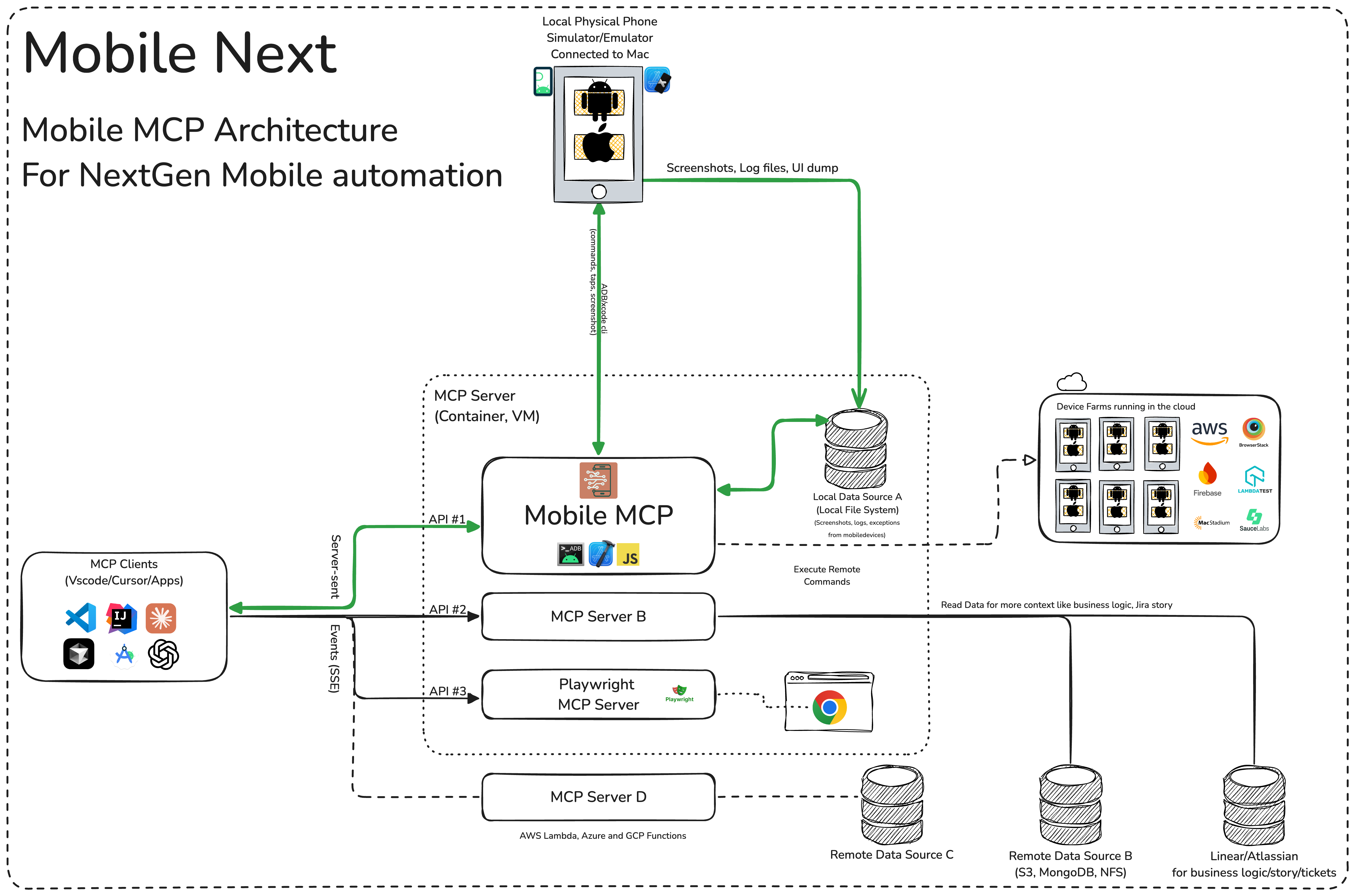
🏗️ Mobile MCP Architecture
mobile-mcp

📚 Wiki page

More details in our wiki page for setup, configuration and debugging related questions.

Prerequisites

What you will need to connect MCP with your agent and mobile devices:

Installation and configuration

Standard config works in most of the tools:

{
  "mcpServers": {
    "mobile-mcp": {
      "command": "npx",
      "args": ["-y", "@mobilenext/mobile-mcp@latest"]
    }
  }
}
Amp

Add via the Amp VS Code extension settings screen or by updating your settings.json file:

"amp.mcpServers": {
  "mobile-mcp": {
    "command": "npx",
    "args": [
      "@mobilenext/mobile-mcp@latest"
    ]
  }
}

Amp CLI:

Run the following command in your terminal:

amp mcp add mobile-mcp -- npx @mobilenext/mobile-mcp@latest
Antigravity 2

Antigravity doesn't have a CLI command to add MCP servers, so add it manually. Edit ~/.gemini/config/mcp_config.json and add:

{
  "mcpServers": {
    "mobile-mcp": {
      "command": "npx",
      "args": ["-y", "@mobilenext/mobile-mcp@latest"]
    }
  }
}
Cline

To setup Cline, just add the json above to your MCP settings file.

More in our wiki

Claude Code

Use the Claude Code CLI to add the Mobile MCP server:

claude mcp add mobile-mcp -- npx -y @mobilenext/mobile-mcp@latest
Claude Desktop

Follow the MCP install guide, use json configuration above.

Codex

Use the Codex CLI to add the Mobile MCP server:

codex mcp add mobile-mcp npx "@mobilenext/mobile-mcp@latest"

Alternatively, create or edit the configuration file ~/.codex/config.toml and add:

[mcp_servers.mobile-mcp]
command = "npx"
args = ["@mobilenext/mobile-mcp@latest"]

For more information, see the Codex MCP documentation.

Copilot

Use the Copilot CLI to interactively add the Mobile MCP server:

/mcp add

You can edit the configuration file ~/.copilot/mcp-config.json and add:

{
  "mcpServers": {
    "mobile-mcp": {
      "type": "local",
      "command": "npx",
      "tools": [
        "*"
      ],
      "args": [
        "@mobilenext/mobile-mcp@latest"
      ]
    }
  }
}

For more information, see the Copilot CLI documentation.

Cursor
Click the button to install:

Install in Cursor

Or install manually:

Go to Cursor Settings -> MCP -> Add new MCP Server. Name to your liking, use command type with the command npx -y @mobilenext/mobile-mcp@latest. You can also verify config or add command like arguments via clicking Edit.

Gemini CLI

Use the Gemini CLI to add the Mobile MCP server:

gemini mcp add mobile-mcp npx -y @mobilenext/mobile-mcp@latest
Goose
Click the button to install:

Install in Goose

Or install manually:

Go to Advanced settings -> Extensions -> Add custom extension. Name to your liking, use type STDIO, and set the command to npx -y @mobilenext/mobile-mcp@latest. Click "Add Extension".

Kiro

Follow the MCP Servers documentation. For example in .kiro/settings/mcp.json:

{
  "mcpServers": {
    "mobile-mcp": {
      "command": "npx",
      "args": [
        "@mobilenext/mobile-mcp@latest"
      ]
    }
  }
}
opencode

Follow the MCP Servers documentation. For example in ~/.config/opencode/opencode.json:

{
  "$schema": "https://opencode.ai/config.json",
  "mcp": {
    "mobile-mcp": {
      "type": "local",
      "command": [
        "npx",
        "@mobilenext/mobile-mcp@latest"
      ],
      "enabled": true
    }
  }
}
Windsurf

Open Windsurf settings, navigate to MCP servers, and add a new server using the command type with:

npx @mobilenext/mobile-mcp@latest

Or add the standard config under mcpServers in your settings as shown above.

Read more in our wiki! 🚀

✅ Verify it works

Once the server is configured, ask your agent to list devices:

list available devices

You should get back your running simulators, emulators, and connected devices. If you do, Mobile MCP is wired up correctly. If the list is empty, make sure a simulator or emulator is running (see Prerequisites) — for more help, check the wiki.

☁️ Scale up, use a cloud device

Want to scale to hundreds of devices? Use Mobile MCP in your CI/CD pipeline?

In your Agent, prompt:

log in to mobile next cloud and then show me which remote devices are available to me

Streamable HTTP Server Mode

By default, Mobile MCP runs over stdio. To start a Streamable HTTP server instead, use the --listen flag:

npx @mobilenext/mobile-mcp@latest --listen 3000

This binds to localhost:3000. To bind to a specific interface:

npx @mobilenext/mobile-mcp@latest --listen 0.0.0.0:3000

Then configure your MCP client to connect to http://<host>:3000/mcp (or https://…/mcp behind TLS). The endpoint accepts Streamable HTTP (POST on /mcp); remote mode is stateless (no session affinity required), which works well with Smithery and other horizontal hosts.

Migration note: --listen previously served the deprecated HTTP+SSE transport on /mcp. Clients must use Streamable HTTP against http(s)://host:port/mcp. The old pure-SSE flow on /mcp is no longer available.

When binding to localhost, Host-header DNS rebinding protection is enabled automatically.

Authorization

To require Bearer token authorization on the HTTP server, set the MOBILEMCP_AUTH environment variable:

MOBILEMCP_AUTH=my-secret-token npx @mobilenext/mobile-mcp@latest --listen 3000

When set, all requests must include the header Authorization: Bearer my-secret-token. When unset, the server accepts unauthenticated connections and logs a warning.

🛠️ How to Use

After adding the MCP server to your IDE/Client, you can instruct your AI assistant to use the available tools. For example, in Cursor's agent mode, you could use the prompts below to quickly validate, test and iterate on UI interactions, read information from screen, go through complex workflows. Be descriptive, straight to the point.

✨ Example Prompts

Workflows

You can specify detailed workflows in a single prompt, verify business logic, setup automations. You can go crazy:

Search for a video, comment, like and share it.

Find the video called " Beginner Recipe for Tonkotsu Ramen" by Way of
Ramen, click on like video, after liking write a comment " this was
delicious, will make it next Friday", share the video with the first
contact in your whatsapp list.

Download a successful step counter app, register, setup workout and 5-star the app

Find and Download a free "Pomodoro" app that has more than 1k stars.
Launch the app, register with my email, after registration find how to
start a pomodoro timer. When the pomodoro timer started, go back to the
app store and rate the app 5 stars, and leave a comment how useful the
app is.

Search in Substack, read, highlight, comment and save an article

Open Substack website, search for "Latest trends in AI automation 2025",
open the first article, highlight the section titled "Emerging AI trends",
and save article to reading list for later review, comment a random
paragraph summary.

Reserve a workout class, set timer

Open ClassPass, search for yoga classes tomorrow morning within 2 miles,
book the highest-rated class at 7 AM, confirm reservation,
setup a timer for the booked slot in the phone

Find a local event, setup calendar event

Open Eventbrite, search for AI startup meetup events happening this
weekend in "Austin, TX", select the most popular one, register and RSVP
yes to the event, setup a calendar event as a reminder.

Check weather forecast and send a Whatsapp/Telegram/Slack message

Open Weather app, check tomorrow's weather forecast for "Berlin", and
send the summary via Whatsapp/Telegram/Slack to contact "Lauren Trown",
thumbs up their response.
  • Schedule a meeting in Zoom and share invite via email
Open Zoom app, schedule a meeting titled "AI Hackathon" for tomorrow at
10AM with a duration of 1 hour, copy the invitation link, and send it via
Gmail to contacts "team@example.com".

Running & configuration

Environment variables

Variable Description Example
MOBILEMCP_AUTH Require a Bearer token on the Streamable HTTP server (--listen) — every request must then send Authorization: Bearer <token>. MOBILEMCP_AUTH=my-secret-token
MOBILEMCP_DISABLE_TELEMETRY Disable anonymous usage telemetry. MOBILEMCP_DISABLE_TELEMETRY=1
MOBILEMCP_ALLOW_UNSAFE_URLS Allow mobile_open_url to open non-standard URL schemes (blocked by default). MOBILEMCP_ALLOW_UNSAFE_URLS=1
MOBILEMCP_LEGACY_ROBOT Use the legacy platform-specific robots for Android devices and physical iOS devices. iOS simulators continue to use mobilecli. MOBILEMCP_LEGACY_ROBOT=1

Simulators, Emulators, and Real Devices

When launched, Mobile MCP can connect to:

  • iOS Simulators on macOS/Linux
  • Android Emulators on Linux/Windows/macOS
  • iOS or Android real devices (requires proper platform tools and drivers)

Make sure you have your mobile platform SDKs (Xcode, Android SDK) installed and configured properly before running Mobile Next Mobile MCP.

Telemetry

Mobile MCP collects anonymous usage telemetry via PostHog and Scarf. To disable it, set the MOBILEMCP_DISABLE_TELEMETRY environment variable:

MOBILEMCP_DISABLE_TELEMETRY=1 npx @mobilenext/mobile-mcp@latest

For json configurations:

{
  "mcpServers": {
    "mobile-mcp": {
      "command": "npx",
      "args": ["-y", "@mobilenext/mobile-mcp@latest"],
      "env": {
        "MOBILEMCP_DISABLE_TELEMETRY": "1"
      }
    }
  }
}

Running in "headless" mode on Simulators/Emulators

When you do not have a real device connected to your machine, you can run Mobile MCP with an emulator or simulator in the background.

For example, on Android:

  1. Start an emulator (avdmanager / emulator command).
  2. Run Mobile MCP with the desired flags

On iOS, you'll need Xcode and to run the Simulator before using Mobile MCP with that simulator instance.

  • xcrun simctl list
  • xcrun simctl boot "iPhone 16"

🧩 Part of Mobile Next

Mobile MCP is one piece of a toolkit for driving real mobile devices:

  • mobilewright — "Playwright for mobile." When you're ready to turn agent-driven exploration into repeatable, deterministic tests for iOS and Android, graduate to mobilewright.
  • mobilecli — the universal device CLI that Mobile MCP is built on: control devices, simulators, and emulators from the command line or a JSON-RPC API.
  • Mobile Next Cloud — the same stack, rented: real iOS and Android devices on demand. Just prompt your agent: log in to mobile next cloud and then show me which remote devices are available to me to get started.

🚀 Roadmap

We're continuously improving Mobile MCP. See what we're building next in ROADMAP.md — priorities are shaped heavily by community feedback, so tell us what you'd like to see.

🤝 Contributing

Contributions are welcome — code, docs, bug reports, and ideas.

Please also review our Code of Conduct.

Thanks to all contributors ❤️

We appreciate everyone who has helped improve this project.

Privacy Policy

Mobile MCP runs locally and communicates only with the devices you connect. See the Mobile Next privacy policy at https://mobilenext.ai/privacy for data collection, usage, retention, and contact information.

View on GitHub

Recent activity

commits and pull requests

Releases and announcements

54 total
  1. Version 1.0.41.0.4Sep 13, 2026

    * Feat: Serve Streamable HTTP on `--listen` at `/mcp`; the removed `/sse` endpoint now returns 410 with a migration note ([#441](https://github.com/mobile-next/mobile-mcp/pull/441)) * Fix: Every `mobile_take_screenshot` result now states how to convert positions in the screenshot into screen coordinates, so taps derived from downscaled screenshots land where intended ([#440](https://github.com/mobile-next/mobile-mcp/pull/440), closes [#29](https://github.com/mobile-next/mobile-mcp/issues/29), [#163](https://github.com/mobile-next/mobile-mcp/issues/163))

  2. 1.0.31.0.3Sep 8, 2026

    * Feat: Add `mobile_batch_commands` tool to run several tools in one call for major performance boost ([#427](https://github.com/mobile-next/mobile-mcp/pull/427)) * Feat: Request to list elements (refresh) after commands end, to sync state ([#427](https://github.com/mobile-next/mobile-mcp/pull/427)) * Feat: Click on element by `@ref` from `mobile_list_elements_on_screen` ([#429](https://github.com/mobile-next/mobile-mcp/pull/429)) * Feat: Text format for `mobile_list_elements_on_screen`, now the default, ~5x smaller than json ([#431](https://github.com/mobile-next/mobile-mcp/pull/431)) * Feat: Add geo location, clipboard and device logs tools ([#423](https://github.com/mobile-next/mobile-mcp/pull/423)) * Feat: Add `mobile_get_foreground_app` tool ([#420](https://github.com/mobile-next/mobile-mcp/pull/420)) * Feat: Scale screenshots natively via mobilecli, drop sips/imagemagick ([#418](https://github.com/mobile-next/mobile-mcp/pull/418)) * Feat: Agent Plugin packaging, mobile-automation skill, MCPB bundle and Smithery CI ([#416](https://github.com/mobile-next/mobile-mcp/pull/416), [#415](https://github.com/mobile-next/mobile-mcp/pull/415)) * Feat: Run device commands through

  3. Version 1.0.21.0.2Aug 9, 2026

    * Fix: Round coordinates before passing them to mobilecli ([#403](https://github.com/mobile-next/mobile-mcp/pull/403)), thanks to [@a1573595](https://github.com/a1573595) * Fix(android): Recurse into mobilecli children when listing UI elements ([#406](https://github.com/mobile-next/mobile-mcp/pull/406))

  4. Version 1.0.11.0.1Aug 9, 2026

    * Feat(cloud): Improve remote device MCP tools and add Mobile Next Cloud logi ([#398](https://github.com/mobile-next/mobile-mcp/pull/398))

  5. Version 1.0.01.0.0Aug 2, 2026

    **BREAKING CHANGE** Starting from version 1.0.0, mobilecli is used as the backend, instead of the old typescript code. If you see any regression, please let us know immediately through a github issue (https://github.com/mobile-next/mobile-mcp/issues) You can use environment variable `MOBILEMCP_LEGACY_ROBOT` to force old implementation. Legacy code will be removed 1 month from this notice. * Feat: Route devices through mobilecli by default ([#396](https://github.com/mobile-next/mobile-mcp/pull/396))

Commits per week

last 52 weeks
270Week of 2025-09-28: 0 commitsWeek of 2025-10-05: 17 commitsWeek of 2025-10-12: 0 commitsWeek of 2025-10-19: 3 commitsWeek of 2025-10-26: 7 commitsWeek of 2025-11-02: 0 commitsWeek of 2025-11-09: 3 commitsWeek of 2025-11-16: 3 commitsWeek of 2025-11-23: 0 commitsWeek of 2025-11-30: 0 commitsWeek of 2025-12-07: 5 commitsWeek of 2025-12-14: 0 commitsWeek of 2025-12-21: 0 commitsWeek of 2025-12-28: 4 commitsWeek of 2026-01-04: 1 commitsWeek of 2026-01-11: 2 commitsWeek of 2026-01-18: 0 commitsWeek of 2026-01-25: 3 commitsWeek of 2026-02-01: 4 commitsWeek of 2026-02-08: 0 commitsWeek of 2026-02-15: 0 commitsWeek of 2026-02-22: 7 commitsWeek of 2026-03-01: 8 commitsWeek of 2026-03-08: 4 commitsWeek of 2026-03-15: 3 commitsWeek of 2026-03-22: 5 commitsWeek of 2026-03-29: 10 commitsWeek of 2026-04-05: 2 commitsWeek of 2026-04-12: 4 commitsWeek of 2026-04-19: 0 commitsWeek of 2026-04-26: 3 commitsWeek of 2026-05-03: 1 commitsWeek of 2026-05-10: 3 commitsWeek of 2026-05-17: 3 commitsWeek of 2026-05-24: 2 commitsWeek of 2026-05-31: 3 commitsWeek of 2026-06-07: 4 commitsWeek of 2026-06-14: 2 commitsWeek of 2026-06-21: 0 commitsWeek of 2026-06-28: 5 commitsWeek of 2026-07-05: 9 commitsWeek of 2026-07-12: 2 commitsWeek of 2026-07-19: 0 commitsWeek of 2026-07-26: 2 commitsWeek of 2026-08-02: 4 commitsWeek of 2026-08-09: 3 commitsWeek of 2026-08-16: 1 commitsWeek of 2026-08-23: 2 commitsWeek of 2026-08-30: 13 commitsWeek of 2026-09-06: 27 commitsWeek of 2026-09-13: 6 commitsWeek of 2026-09-20: 3 commitsSep 28, 2025Sep 20, 2026
193 commits in the last 52 weeks.

When work happens

weekday and hour
SunMonTueWedThuFriSat036912151821Sun 0:00 — 0 commitsSun 1:00 — 0 commitsSun 2:00 — 0 commitsSun 3:00 — 0 commitsSun 4:00 — 0 commitsSun 5:00 — 0 commitsSun 6:00 — 0 commitsSun 7:00 — 0 commitsSun 8:00 — 0 commitsSun 9:00 — 3 commitsSun 10:00 — 2 commitsSun 11:00 — 7 commitsSun 12:00 — 6 commitsSun 13:00 — 1 commitsSun 14:00 — 1 commitsSun 15:00 — 1 commitsSun 16:00 — 7 commitsSun 17:00 — 15 commitsSun 18:00 — 5 commitsSun 19:00 — 0 commitsSun 20:00 — 9 commitsSun 21:00 — 9 commitsSun 22:00 — 4 commitsSun 23:00 — 1 commitsMon 0:00 — 1 commitsMon 1:00 — 4 commitsMon 2:00 — 1 commitsMon 3:00 — 0 commitsMon 4:00 — 0 commitsMon 5:00 — 0 commitsMon 6:00 — 0 commitsMon 7:00 — 1 commitsMon 8:00 — 1 commitsMon 9:00 — 0 commitsMon 10:00 — 9 commitsMon 11:00 — 7 commitsMon 12:00 — 4 commitsMon 13:00 — 0 commitsMon 14:00 — 2 commitsMon 15:00 — 2 commitsMon 16:00 — 2 commitsMon 17:00 — 1 commitsMon 18:00 — 4 commitsMon 19:00 — 1 commitsMon 20:00 — 8 commitsMon 21:00 — 6 commitsMon 22:00 — 5 commitsMon 23:00 — 0 commitsTue 0:00 — 2 commitsTue 1:00 — 1 commitsTue 2:00 — 0 commitsTue 3:00 — 1 commitsTue 4:00 — 0 commitsTue 5:00 — 1 commitsTue 6:00 — 0 commitsTue 7:00 — 0 commitsTue 8:00 — 4 commitsTue 9:00 — 1 commitsTue 10:00 — 4 commitsTue 11:00 — 1 commitsTue 12:00 — 3 commitsTue 13:00 — 2 commitsTue 14:00 — 9 commitsTue 15:00 — 7 commitsTue 16:00 — 5 commitsTue 17:00 — 9 commitsTue 18:00 — 0 commitsTue 19:00 — 3 commitsTue 20:00 — 0 commitsTue 21:00 — 3 commitsTue 22:00 — 0 commitsTue 23:00 — 2 commitsWed 0:00 — 1 commitsWed 1:00 — 1 commitsWed 2:00 — 1 commitsWed 3:00 — 0 commitsWed 4:00 — 0 commitsWed 5:00 — 0 commitsWed 6:00 — 0 commitsWed 7:00 — 0 commitsWed 8:00 — 3 commitsWed 9:00 — 5 commitsWed 10:00 — 1 commitsWed 11:00 — 6 commitsWed 12:00 — 0 commitsWed 13:00 — 0 commitsWed 14:00 — 0 commitsWed 15:00 — 1 commitsWed 16:00 — 3 commitsWed 17:00 — 2 commitsWed 18:00 — 2 commitsWed 19:00 — 1 commitsWed 20:00 — 2 commitsWed 21:00 — 0 commitsWed 22:00 — 0 commitsWed 23:00 — 0 commitsThu 0:00 — 0 commitsThu 1:00 — 0 commitsThu 2:00 — 0 commitsThu 3:00 — 1 commitsThu 4:00 — 0 commitsThu 5:00 — 2 commitsThu 6:00 — 0 commitsThu 7:00 — 0 commitsThu 8:00 — 0 commitsThu 9:00 — 0 commitsThu 10:00 — 0 commitsThu 11:00 — 1 commitsThu 12:00 — 2 commitsThu 13:00 — 3 commitsThu 14:00 — 2 commitsThu 15:00 — 4 commitsThu 16:00 — 3 commitsThu 17:00 — 2 commitsThu 18:00 — 4 commitsThu 19:00 — 0 commitsThu 20:00 — 3 commitsThu 21:00 — 7 commitsThu 22:00 — 2 commitsThu 23:00 — 2 commitsFri 0:00 — 3 commitsFri 1:00 — 0 commitsFri 2:00 — 0 commitsFri 3:00 — 0 commitsFri 4:00 — 0 commitsFri 5:00 — 0 commitsFri 6:00 — 0 commitsFri 7:00 — 0 commitsFri 8:00 — 0 commitsFri 9:00 — 2 commitsFri 10:00 — 2 commitsFri 11:00 — 11 commitsFri 12:00 — 0 commitsFri 13:00 — 3 commitsFri 14:00 — 4 commitsFri 15:00 — 2 commitsFri 16:00 — 0 commitsFri 17:00 — 4 commitsFri 18:00 — 2 commitsFri 19:00 — 3 commitsFri 20:00 — 2 commitsFri 21:00 — 2 commitsFri 22:00 — 12 commitsFri 23:00 — 1 commitsSat 0:00 — 7 commitsSat 1:00 — 0 commitsSat 2:00 — 1 commitsSat 3:00 — 0 commitsSat 4:00 — 1 commitsSat 5:00 — 1 commitsSat 6:00 — 0 commitsSat 7:00 — 4 commitsSat 8:00 — 1 commitsSat 9:00 — 8 commitsSat 10:00 — 6 commitsSat 11:00 — 2 commitsSat 12:00 — 2 commitsSat 13:00 — 0 commitsSat 14:00 — 2 commitsSat 15:00 — 4 commitsSat 16:00 — 0 commitsSat 17:00 — 0 commitsSat 18:00 — 2 commitsSat 19:00 — 4 commitsSat 20:00 — 5 commitsSat 21:00 — 11 commitsSat 22:00 — 5 commitsSat 23:00 — 0 commits
Commit volume by weekday and hour (UTC). Larger dots mean more commits.
DateListRankStars gained
Sep 28, 2026daily#11+573
Sep 27, 2026daily#11+573
Sep 26, 2026daily#11+143
  • freeCodeCamp/freeCodeCamp

    freeCodeCamp.org's open-source codebase and curriculum. Learn math, programming, and computer science for free.

    456.7K stars · TypeScript

  • openclaw/openclaw

    The AI that really does things. Any OS. Any Platform. The lobster way. 🦞

    391.3K stars · TypeScript

  • affaan-m/ECC

    The agent harness performance optimization system. Skills, instincts, memory, security, and research-first development for Claude Code, Codex, Opencode, Cursor and beyond.

    272.8K stars · JavaScript

  • anomalyco/opencode

    The open source coding agent.

    211.7K stars · TypeScript

  • n8n-io/n8n

    Fair-code workflow automation platform with native AI capabilities. Combine visual building with custom code, self-host or cloud, 400+ integrations.

    206.7K stars · TypeScript

  • microsoft/vscode

    Visual Studio Code

    193.5K stars · TypeScript



